
• 0 Posts
  • 4 Comments
Joined 3 months ago
cake
Cake day: February 13th, 2026

help-circle
  • Depending on the type of motor, it may still have a motor capacitor to help it get started. Certain types of electric motors need a capacitor in order to start safely from a standstill, no matter how old they are. (And such motor capacitors can often be pretty large and dangerous.) And even if you’re not opening the motor housing where such a capacitor would probably be located, that capacitor will still be connected to certain electrical leads inside the machine, and touching those leads could expose you to it.

    So still a good idea to check.


  • 30V won’t kill you.

    Well, it definitely can, in certain circumstances – if there’s enough amperage available and if something (such as having wet hands) reduces the electrical resistance of your skin.


    But, yes, with current in the micro-amps even when dead shorted, this shouldn’t be too dangerous.

    Though, OP feeling a tingling when they touch it gives me pause. 30V shouldn’t really do that in most cases. OP is measuring AC voltage here, but maybe there’s also a DC voltage on it?


  • Not really any way to determine this on paper, really. Other than ‘it depends’.

    Depends on what materials the walls are made of, the model of your wifi router, the orientation of your router’s antenna(s), the orientation of your laptop or phone or whatever’s antenna, what obstacles or vegetation might be between the two buildings, what other devices nearby might be producing interference, whether or not Mercury is in retrograde, etc. In an edge case, even the daily humidity or precipitation may make the difference between a usable or unusable signal.


    As others have said, the best way to test would be to just stand with your phone at the location where you’d put the repeater and see if your phone gets a strong wifi signal there. If it does, a repeater will probably work.


    However, a repeater isn’t the only solution that could work here. Other potentially good solutions:

    • Run an ethernet cable from the house to the office. (Faster, more reliable, but would require running wires.)

    • Use a network over power lines setup, to have wired network without needing to run any new wires. (Still faster than wifi; might not be quite as reliable as other setups, though.)

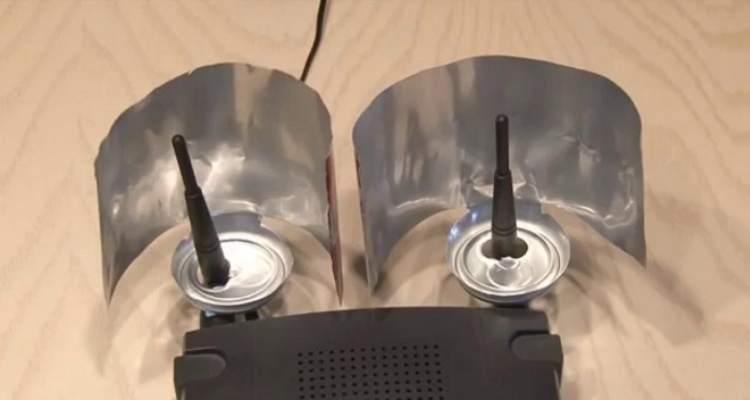
    • Use a directional wifi antenna to extend the range of your router. If you point it at the office, that will probably extend the range more than enough to reach it. (A directional antenna will be more reliable than a repeater, and for a comparable price. Also will save a little electricity, since you don’t have to power the repeater.) If you want to be really cheap and creative, you can make a directional antenna – that can actually be a lot more effective and reliable than it looks, and can be done at basically no cost.

    • Have you tried simply using it without any upgrades? It’s only 70ft away, and wifi can definitely reach that far if conditions are good. Maybe try moving your wifi router closer to a window or exterior wall. If your router has movable antennas, make sure they’re positioned vertically for best signal distance. If you have a lot of neighbors, go into your router’s configuration and experiment with changing the wifi channel. If I remember right, there are 11 different channels, and if you’re on the same channel as a different nearby network, the two will interfere with each other and have greatly reduced range … but if you have it on a different channel, that will avoid interference and improve range.